Web Market
What is Web Market?
Web Market is a premium feature that allows you to post inventory to your WarehouseTWO account so these items might appear in web search engine results.
The purpose of this functionality is to expose inventory to potential buyers, like end-users and resellers, even if they are not a member of WarehouseTWO.
Who Can Post Items to Web Market?
Web Market is a premium feature available to level 3 and above members.
Who Can See Items Posted to Web Market?
Unlike items that are posted to non-Web Market locations, the Web Market is a public site that anyone can access on the internet and can be seen by internet search engines such as Google and Bing.
How Do I Post Inventory to Web Market?
In order to post inventory to Web Market, you will need to create a Web Market location to post these items to.
Items posted to a Web Market location are then posted on https://webmarket.warehousetwo.com which is a public site available for people outside of WarehouseTWO to view, including search engines to potentially use for search results.
How Do I Make a Web Market Location?
You can create a new location or use an existing location to be a Web Market location.
How to Create a New Web Market Location:
- Click “Settings” in the toolbar at the top of the page.
- Click on “Account” to load the account section.
- Click on “Locations” to load location settings.
- Click “Create” on the right hand side to create a new location.
- Fill out the information for the new location.
- To ensure this is a Web Market location, you will need to enable the “Web Market Location” toggle.
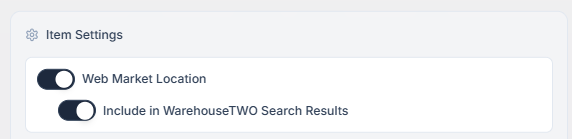
When you enable the Web Market Location toggle, a secondary toggle will appear called “Include in WarehouseTWO Search Results”. This toggle will make those items posted to the Web Market also available for members search results within WarehouseTWO.
How to Change an Existing Location to a Web Market Location
- Click “Settings” in the toolbar at the top of the page.
- Click on “Account” to load the account section.
- Click on “Locations” to load location settings.
- Click “Edit” next to the existing location that you want to change to a Web Market location.
- Scroll down to the item settings and enable the “Web Market Location” toggle.
When you enable the Web Market Location toggle, a secondary toggle will appear called “Include in WarehouseTWO Search Results”. This toggle will make those items posted to the Web Market also available for members search results within WarehouseTWO.